The Import from KML/KMZ Geo Points feature allows Network Map users to quickly obtain a copy of another existing map and integrate it into the currently used and open map.
A use case: when fiber subcontractors who work with VC4-IMS generated KML files who then make small adjustments in routing and equipment positioning. |
This function cannot import non-VC4 IMS generated KML/KMZ files, as those files will not have the correct IMS object and object types. Should there be a need for importing and converting non-VC4 IMS KML/KMZ files, please contact VC4 for a consultation on the possibility of creating a specific import tool. |
From the Network Map Actions button bar:
▪Select the Import option
▪From the drop down list, select the Import from KML/KMZ Geo Points option - this opens up the Import from KML popup window
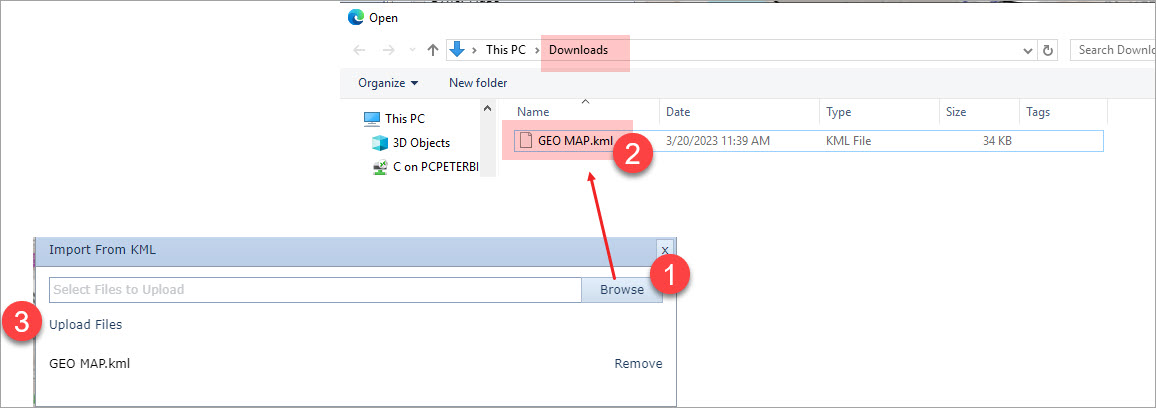
▪Select the Browse button and then select the required KML or KMZ file from the local machine - steps 1 and 2 as shown in the above screen shot
▪Select the Upload Files link - shown in step 3 to complete the import action
This popup window closes and in the IMS lower right corner a Success message is given. The Network Map should now display the same IMS objects that were contained in the imported map file.