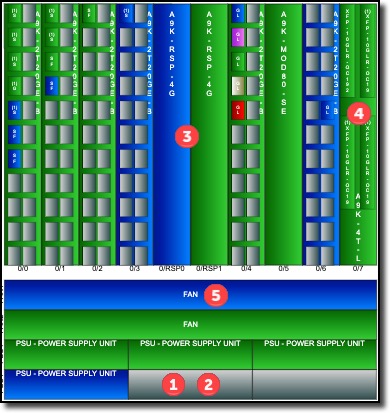
The following describes the image of a particular node / equipment.
1 |
Each rectangle represents a slot |
|
2 |
Empty slots are grey in colour |
|
3 |
Filled slots are in either one of these status colours: |
|
|
Blue: |
[PL] Planned |
Purple |
[RFS] Ready for Service |
|
Green |
[IS] In Service |
|
Brown |
[RFC] Reserved for Cease |
|
Red |
[OOS] Out of Service |
|
4 |
A card can have sub-slots with sub-cards (SFP/XPF cards |
|
5 |
A slot can have a card and/or slot label |
|