This chapter describes the Node object in VC4’s IMS.
|
The words Node and Equipment are used interchangeably throughout IMS |

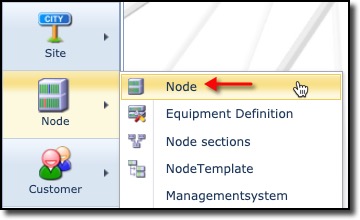
The Node functionality is accessed from the main menu bar, which when selected reveals further node related items in the dropdown list.
▪Select the first item Node.
The Node object is where passive, managed, and logical, network equipment is recorded in IMS.
|
For Optical / Digital Distribution Frames and Racks, there are separate objects in the Node menu to be used to record these network equipment items. |
New in 22.6
oPart Number property added to Node : Cards tab
oCable Route option now on Port - right click menu