Introduction
This section describes the process for setting up work orders (Order/TT) to send out emails with reports for Orders that are:
oAssigned
oDispatched
oLogging - Modified with additional user information
If you do not require reports to be included in the email notifications then no further action is required, as IMS will simply use its preconfigured standard fields and text information that is produced automatically
The IMS standard installation already provides the user with 4 settings relating to email notifications for the Order/TT system (Work Orders and Trouble Tickets).
Although there are 4 settings, one for each of the work order actions of Assigning, Dispatching, Logging, and Closing, there is no current option for report attachment for the Closing action of an order.
By default, the inclusion of a report in an email notification is not set up and therefore must be defined and configured in the User Settings module in IMS.
Appropriate Reports representing the information relevant for each of the 3 types of email notifications must also be created by the appropriate end user.
In this document we will provide an example report that can be used or tweaked if so desired. The report will be in an XML paragraph which can be pasted into a new report instance. More on this further on.
NOTE:
oWriting or designing a report is out of scope for this section.
oCustomer's e-mail server will require configuring in order to send the e-mails (e-mail relay).
oIf and when using the Dispatched report (DISPATCHEDORDER_MAIL) make sure you add the parameter called ContactId to the Parameters section of the Field List option as shown in the following screen shot:
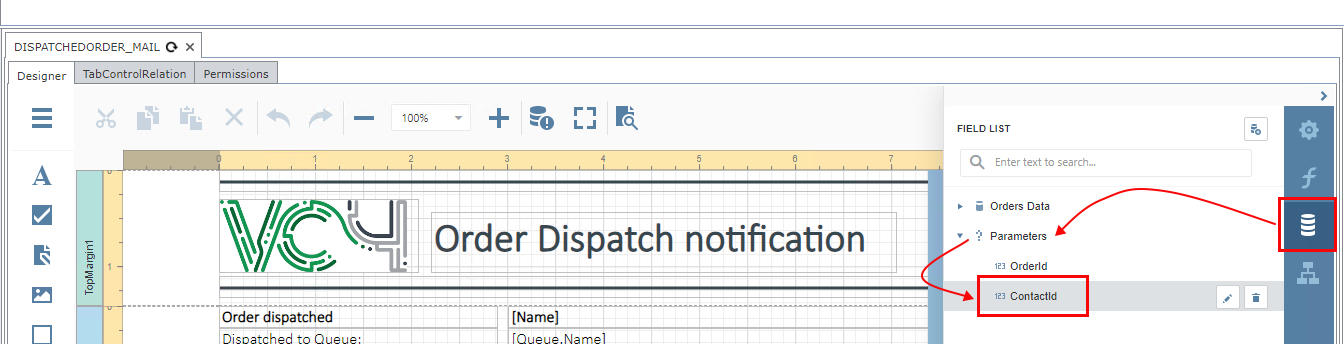
User Settings configuration
As stated above IMS contains 3 settings that provide email notifications with reports, but these by default, are
in an application property process file only and must be reference from and within the IMS GUI should reports
have to be included in the emails.
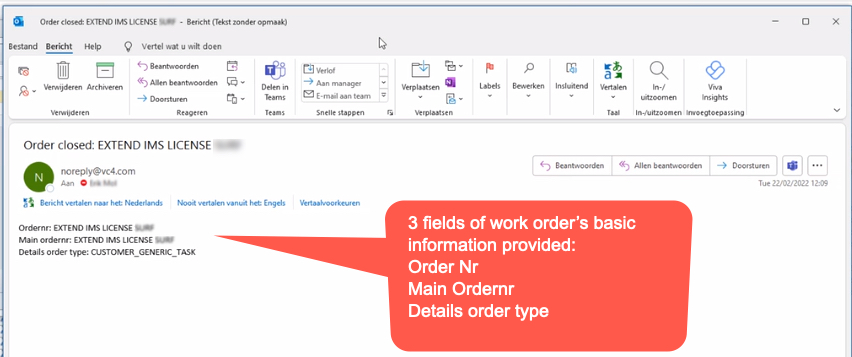
Please remember that for the Closing of an order, no Report attaching functionality is available in the email
notification – only the standard email with textual fields and information will be provided. See the following
screenshot as an example:
The next steps must be followed to define and configure the UserSettings to enable report attachment to email
notifications.

|
Click on the System icon in the main IMS menu bar |
|
Select the Users option from the first dropdown list |
|
Select the UserSettings from the second dropdown list provided |
|
This opens up the UserSettings popup window |
|
Select the New option (paper sheet icon) in order to create the three hidden available settings for Assigning, Dispatching, and Logging work orders |


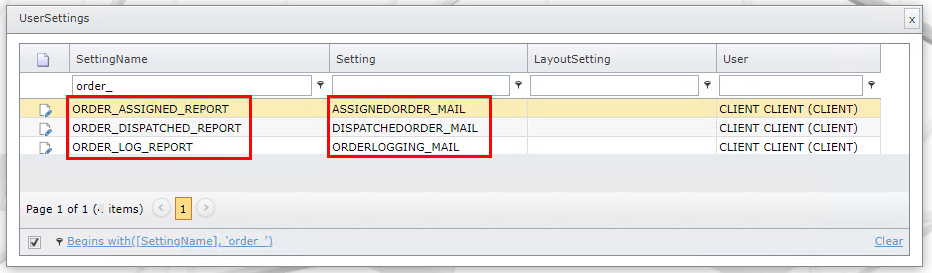
Create 3 rows with the following information, the first informational column called SettingName must be completed
exactly as in the screenshot, as these settings will relate to their coded settings in the property file (system file).
ORDER_ASSIGNED_REPORT
ORDER_DISPATCHED_REPORT
ORDER_LOG_REPORT
▪Remember to Save your work for each line added in the User Settings popup window.
The information in the second informational column called Setting, simply reflects the names of the related
Report names, and will be called from the email notification process. Each customer may call their reports
according to their own requirements or naming standards.
Relating a Queue to Contacts
In order for the appropriate Contacts, registered in the IMS database, to receive notifications, they must be
related to their specific Queues. A contact may be related to more than one Queue.
If a Contact is not receiving any notification when an Order/TT or Task is assigned to a Queue, it could be
that they have not been setup in the appropriate queue.
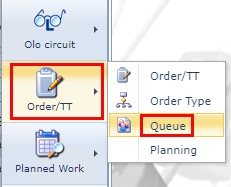
This can be achieved by first selecting the Queue option from the Order/TT module in the IMS Main Menu
as shown in this screenshot.
This will open up the Queue form and the following steps are required to be carried out:

|
Select the required Queue from the Search area that will be related to a Contact |
|
From the button bar, select the Relate Queue to Contact option – this will open up a popup window form |
|
From the Contact field drop down list, select the required Contact |
|
Click on the Save icon to process the selection |
|
The newly added Contact details will appear in the Related Contacts tab |
Repeat the above steps when further contacts are required.
User Settings – by Order Type
In the previous chapter we see how a generic Email and Report will be sent out for any Order when it is
assigned. This is not always desirable.
It is possible to be more specific in the sending out of emails with reports, by selecting the required Order Type
instance and choosing a different Report.
In this example the Order Type for an Order/TT is called Invoice. In other words, every time an order of type
Invoice is created and assigned, the appropriate Report will be used – in this example a Report called Assignedorder_Mail_Invoice.
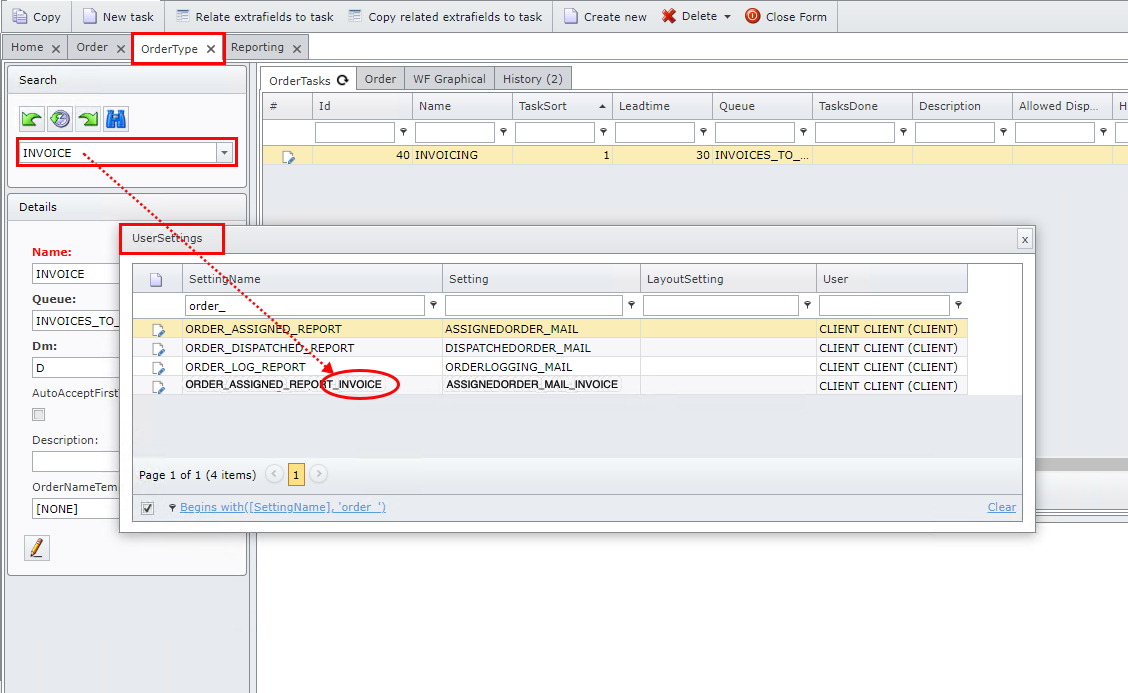
The process to follow is the same as in the previous chapter with the added step of including the Order Type
instance name at the end of the desired Setting Name instance, in this case ORDER_ASSIGNED_REPORT.
▪Type in an underscore character followed by INVOICE – see the above screenshot
▪In the corresponding Setting column, type in the name of the required Report
It stands to reason that a different Report will be needed that best represents the Email notification for Invoice type Orders assigned.
Example Report - XML
In order to complete the setting up of an Email notification with a Report, we will create an Assigned Order type
Report using an existing Report’s XML as input.
In this example there are two reports needed to be created
▪ASSIGNEDORDER_MAIL (master report – calls the subreport)
▪ORDERLOGGINGS_SUBREPORT (subreport)
Follow the next steps to create reports from XML schemas:
|
Click on the System icon in the main IMS menu bar |
|
Select the Reporting option from the first dropdown list |
|
Select the Document option from the second dropdown list provided |
|
Click on the Create new option from the Report Actions button bar |
|
Type in the Name as ASSIGNEDORDER_MAIL |
|
Copy the XML contents of Appendix A into the report field called LayoutData
|
|
Click the Save icon to finish |

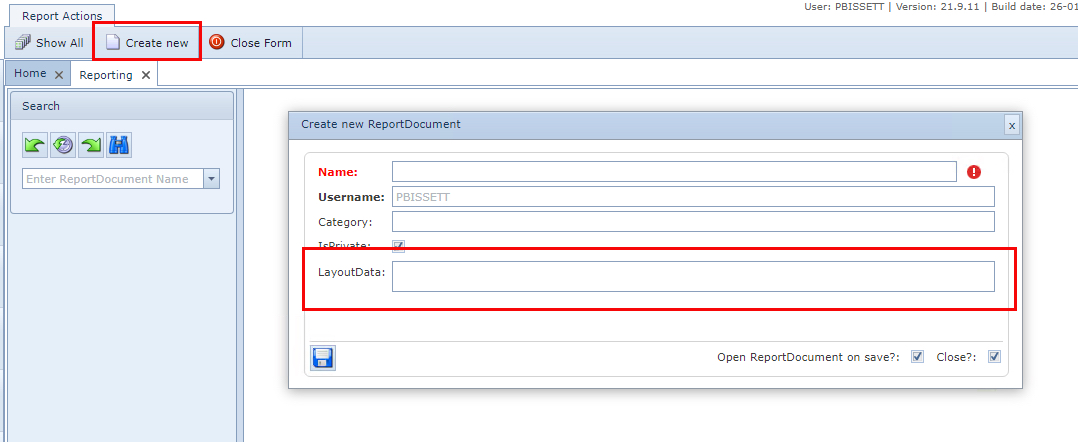

We will now create the subreport from the XML schema contained in Appendix B.
Repeat the steps above but this time for:
▪step 5, the name of the report will be ORDERLOGGINGS_SUBREPORT
▪step 6, you will copy the XML contents of Appendix B and paste accordingly
The final step is to create a new order and assign it …

Appendix A
Important to read before copying and pasting the XML content below:
1 |
After any modification to the report make sure you click the Save button, otherwise your work will be lost and not take effect. |
2 |
When you look at this report in the Designer mode, having copied and pasted the XML content below, you will see 2 paragraphs in red text giving instructions on how to add your logo.img and your IMS Server details, in the form of a URL link within the report. |
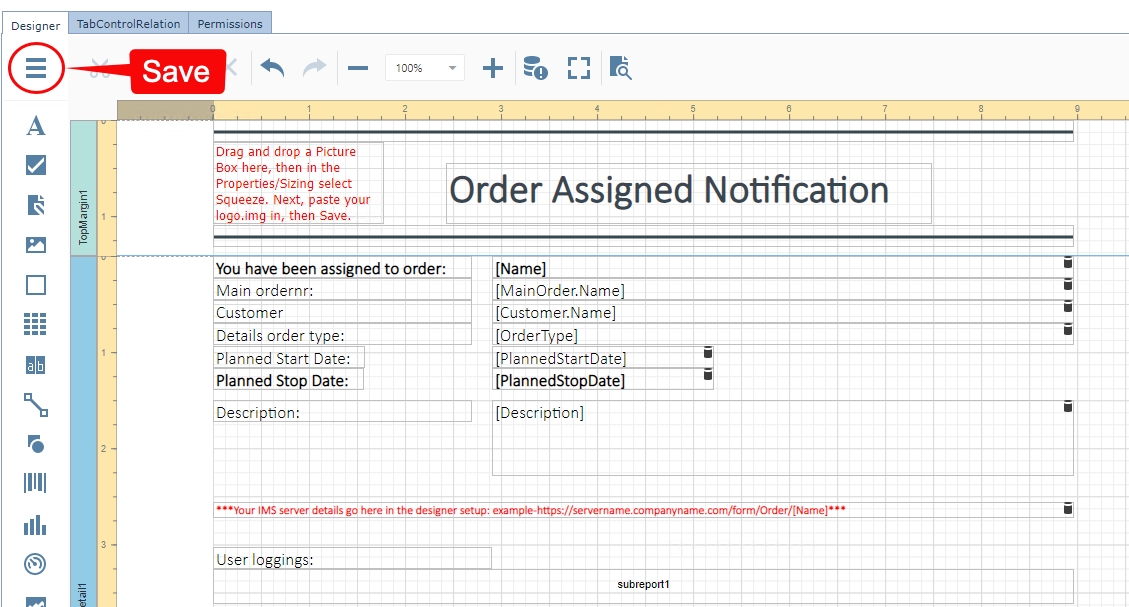
Copy the XML code below this line
<?xml version="1.0" encoding="utf-8"?>
<XtraReportsLayoutSerializer SerializerVersion="19.2.6.0" Ref="1" ControlType="DevExpress.XtraReports.UI.XtraReport, DevExpress.XtraReports.v19.2, Version=19.2.6.0, Culture=neutral, PublicKeyToken=b88d1754d700e49a" Name="ASSIGNEDORDER_MAIL" DisplayName="ASSIGNEDORDER_MAIL" Margins="100, 100, 142, 79" PaperKind="ESheet" PageWidth="3400" PageHeight="4400" Version="19.2" FilterString="[Id] = ?OrderId" DataMember="Order" DataSource="#Ref-0">
<Extensions>
<Item1 Ref="2" Key="DataSerializationExtension" Value="DevExpress.XtraReports.Web.ReportDesigner.DefaultDataSerializer" />
</Extensions>
<Parameters>
<Item1 Ref="4" Description="OrderId" ValueInfo="0" Name="OrderId" Type="#Ref-3" />
</Parameters>
<Bands>
<Item1 Ref="5" ControlType="TopMarginBand" Name="TopMargin1" HeightF="142">
<Controls>
<Item1 Ref="6" ControlType="XRLine" Name="line1" LineWidth="3" SizeF="897.36,23" LocationFloat="0, 0" ForeColor="255,55,71,79">
<StylePriority Ref="7" UseForeColor="false" />
</Item1>
<Item3 Ref="9" ControlType="XRLabel" Name="label16" CanGrow="false" Text="Order Assigned Notification" WordWrap="false" SizeF="506.18,63.07" LocationFloat="242.74, 45.28" Font="Calibri Light, 30pt, style=Bold" ForeColor="255,55,71,79" Padding="2,2,0,0,100">
<StylePriority Ref="10" UseFont="false" UseForeColor="false" />
</Item3>
<Item4 Ref="11" ControlType="XRLine" Name="line2" LineWidth="3" SizeF="897.38,23" LocationFloat="0, 109.75" ForeColor="255,55,71,79" BorderColor="255,55,71,79">
<StylePriority Ref="12" UseForeColor="false" UseBorderColor="false" />
</Item4>
</Controls>
</Item1>
<Item2 Ref="13" ControlType="DetailBand" Name="Detail1" HeightF="385.41">
<Controls>
<ExpressionBindings>
<Item1 Ref="15" EventName="BeforePrint" PropertyName="NavigateUrl" Expression="'https://workflow.vc4.com/form/Order/' + [Name]" />
</ExpressionBindings>
<StylePriority Ref="16" UseFont="false" UseForeColor="false" />
</Item1>
<Item2 Ref="17" ControlType="XRLabel" Name="label13" Multiline="true" Text="label13" SizeF="606.2,23" LocationFloat="290.63, 46" Font="Calibri Light, 13pt" Padding="2,2,0,0,100">
<ExpressionBindings>
<Item1 Ref="18" EventName="BeforePrint" PropertyName="Text" Expression="[Customer.Name]" />
</ExpressionBindings>
<StylePriority Ref="19" UseFont="false" />
</Item2>
<Item3 Ref="20" ControlType="XRLabel" Name="label12" Multiline="true" Text="Customer" SizeF="269.79,23" LocationFloat="0, 46" Font="Calibri Light, 13pt" Padding="2,2,0,0,100">
<StylePriority Ref="21" UseFont="false" />
</Item3>
<Item4 Ref="22" ControlType="XRSubreport" Name="subreport1" ReportSourceUrl="ORDERLOGGINGS_SUBREPORT" SizeF="897.36,36.52" LocationFloat="0, 326.02">
<ParameterBindings>
<Item1 Ref="23" ParameterName="OrderId" DataMember="Order.MainOrderId" />
</ParameterBindings>
</Item4>
<Item5 Ref="24" ControlType="XRLabel" Name="label19" Multiline="true" Text="label19" SizeF="606.72,78.78" LocationFloat="290.63, 150" Font="Calibri Light, 13pt" Padding="2,2,0,0,100">
<ExpressionBindings>
<Item1 Ref="25" EventName="BeforePrint" PropertyName="Text" Expression="[Description]" />
</ExpressionBindings>
<StylePriority Ref="26" UseFont="false" />
</Item5>
<Item6 Ref="27" ControlType="XRLabel" Name="label18" Multiline="true" Text="Description:" SizeF="269.79,23" LocationFloat="0, 150" Font="Calibri Light, 13pt" Padding="2,2,0,0,100">
<StylePriority Ref="28" UseFont="false" />
</Item6>
<Item7 Ref="29" ControlType="XRLabel" Name="label11" Multiline="true" Text="User loggings:" SizeF="290.63,23" LocationFloat="0, 303.02" Font="Calibri Light, 13pt" Padding="2,2,0,0,100">
<StylePriority Ref="30" UseFont="false" />
</Item7>
<Item8 Ref="31" ControlType="XRLabel" Name="label10" Multiline="true" Text="label10" SizeF="231.22,23" LocationFloat="290.63, 116.03" Font="Calibri Light, 13pt, style=Bold" Padding="2,2,0,0,100">
<ExpressionBindings>
<Item1 Ref="32" EventName="BeforePrint" PropertyName="Text" Expression="[PlannedStopDate]" />
</ExpressionBindings>
<StylePriority Ref="33" UseFont="false" />
</Item8>
<Item9 Ref="34" ControlType="XRLabel" Name="label9" Multiline="true" Text="label9" SizeF="231.22,23" LocationFloat="290.63, 93.03" Font="Calibri Light, 13pt" Padding="2,2,0,0,100">
<ExpressionBindings>
<Item1 Ref="35" EventName="BeforePrint" PropertyName="Text" Expression="[PlannedStartDate]" />
</ExpressionBindings>
<StylePriority Ref="36" UseFont="false" />
</Item9>
<Item10 Ref="37" ControlType="XRLabel" Name="label8" Multiline="true" Text="Planned Stop Date:" SizeF="157.29,23" LocationFloat="0, 116.03" Font="Calibri Light, 13pt, style=Bold" Padding="2,2,0,0,100">
<StylePriority Ref="38" UseFont="false" />
</Item10>
<Item11 Ref="39" ControlType="XRLabel" Name="label7" Multiline="true" Text="Planned Start Date:" SizeF="158.33,23" LocationFloat="0, 93.03" Font="Calibri Light, 13pt" Padding="2,2,0,0,100">
<StylePriority Ref="40" UseFont="false" />
</Item11>
<Item12 Ref="41" ControlType="XRLabel" Name="label6" Multiline="true" Text="label6" SizeF="606.72,23" LocationFloat="290.63, 69" Font="Calibri Light, 13pt" Padding="2,2,0,0,100">
<ExpressionBindings>
<Item1 Ref="42" EventName="BeforePrint" PropertyName="Text" Expression="[OrderType]" />
</ExpressionBindings>
<StylePriority Ref="43" UseFont="false" />
</Item12>
<Item13 Ref="44" ControlType="XRLabel" Name="label5" Multiline="true" Text="label5" SizeF="606.73,23" LocationFloat="290.63, 23" Font="Calibri Light, 13pt" Padding="2,2,0,0,100">
<ExpressionBindings>
<Item1 Ref="45" EventName="BeforePrint" PropertyName="Text" Expression="[MainOrder.Name] " />
</ExpressionBindings>
<StylePriority Ref="46" UseFont="false" />
</Item13>
<Item14 Ref="47" ControlType="XRLabel" Name="label4" Multiline="true" Text="Details order type:" SizeF="269.79,23" LocationFloat="0, 69" Font="Calibri Light, 13pt" Padding="2,2,0,0,100">
<StylePriority Ref="48" UseFont="false" />
</Item14>
<Item15 Ref="49" ControlType="XRLabel" Name="label3" Multiline="true" Text="Main ordernr:" SizeF="269.79,23" LocationFloat="0, 23" Font="Calibri Light, 13pt" Padding="2,2,0,0,100">
<StylePriority Ref="50" UseFont="false" />
</Item15>
<Item16 Ref="51" ControlType="XRLabel" Name="label2" Multiline="true" Text="You have been assigned to order: " SizeF="269.79,23" LocationFloat="0, 0" Font="Calibri Light, 13pt, style=Bold" Padding="2,2,0,0,100">
<StylePriority Ref="52" UseFont="false" />
</Item16>
<Item17 Ref="53" ControlType="XRLabel" Name="label1" Multiline="true" Text="[name]" SizeF="606.73,23" LocationFloat="290.63, 0" Font="Calibri Light, 13pt, style=Bold" Padding="2,2,0,0,100">
<ExpressionBindings>
<Item1 Ref="54" EventName="BeforePrint" PropertyName="Text" Expression="[Name] " />
</ExpressionBindings>
<StylePriority Ref="55" UseFont="false" />
</Item17>
</Controls>
</Item2>
<Item3 Ref="56" ControlType="BottomMarginBand" Name="BottomMargin1" HeightF="79">
<Controls>
<Item1 Ref="57" ControlType="XRLine" Name="line4" LineWidth="3" SizeF="896.81,23" LocationFloat="0, 46.8" ForeColor="255,55,71,79">
<StylePriority Ref="58" UseForeColor="false" />
</Item1>
<Item2 Ref="59" ControlType="XRLine" Name="line3" LineWidth="3" SizeF="897.36,23" LocationFloat="0, 0" ForeColor="255,55,71,79">
<StylePriority Ref="60" UseForeColor="false" />
</Item2>
<Item3 Ref="61" ControlType="XRLabel" Name="label20" Multiline="true" Text="The shortest time to result in OSS – that’s a promise we deliver !" SizeF="561.46,23" LocationFloat="0, 23.8" Font="Calibri Light, 11pt" Padding="2,2,0,0,100">
<StylePriority Ref="62" UseFont="false" />
</Item3>
</Controls>
</Item3>
</Bands>
<ExportOptions Ref="63">
<Pdf Ref="64" ConvertImagesToJpeg="false" />
</ExportOptions>
<ObjectStorage>
<Item1 ObjectType="DevExpress.XtraReports.Serialization.ObjectStorageInfo, DevExpress.XtraReports.v19.2" Ref="3" Content="System.Int32" Type="System.Type" />
<Item2 Ref="0" ObjectType="VC4.IMS.Reporting.Data.ImsEfDataSource,VC4.IMS.Reporting" Name="Orders1" DbSetNameSpace="Orders" ConnectionStringName="IMS Data" ConnectionString="WF_VC4" Source="ImsContextWEFLL, IMSDynamicModels.USWF_VC4-ISWF_VC4-LLT-EFT-SQT.59F66FBF92E4E80E45E9174DDCF77371, Version=0.0.0.0, Culture=neutral, PublicKeyToken=null" />
</ObjectStorage>
</XtraReportsLayoutSerializer>
Appendix B
Copy the XML code below this line
<?xml version="1.0" encoding="utf-8"?>
<XtraReportsLayoutSerializer SerializerVersion="19.2.6.0" Ref="1" ControlType="DevExpress.XtraReports.UI.XtraReport, DevExpress.XtraReports.v19.2, Version=19.2.6.0, Culture=neutral, PublicKeyToken=b88d1754d700e49a" Name="ORDERLOGGINGS_SUBREPORT" DisplayName="ORDERLOGGINGS_SUBREPORT" Margins="100, 100, 3, 3" PageWidth="850" PageHeight="1100" Version="19.2" FilterString="[Order.MainOrderId] = ?OrderId And [TypeLogging] = 'USER'" DataMember="OrderLogging" DataSource="#Ref-0">
<Extensions>
<Item1 Ref="2" Key="DataSerializationExtension" Value="DevExpress.XtraReports.Web.ReportDesigner.DefaultDataSerializer" />
</Extensions>
<Parameters>
<Item1 Ref="4" Description="OrderId" ValueInfo="0" Name="OrderId" Type="#Ref-3" />
</Parameters>
<Bands>
<Item1 Ref="5" ControlType="TopMarginBand" Name="TopMargin1" HeightF="3" />
<Item2 Ref="6" ControlType="DetailBand" Name="Detail1" HeightF="77.17" BorderColor="255,0,104,55">
<SortFields>
<Item1 Ref="7" FieldName="Id" SortOrder="Descending" />
</SortFields>
<Controls>
<Item1 Ref="8" ControlType="XRLine" Name="line1" SizeF="650,23" LocationFloat="0, 48.88" ForeColor="255,0,104,55" BorderColor="255,0,104,55">
<StylePriority Ref="9" UseForeColor="false" UseBorderColor="false" />
</Item1>
<Item2 Ref="10" ControlType="XRLabel" Name="label3" Multiline="true" Text="label3" SizeF="650,21.88" LocationFloat="0, 27" Font="Calibri Light, 10pt" ForeColor="255,55,71,79" Padding="2,2,0,0,100">
<ExpressionBindings>
<Item1 Ref="11" EventName="BeforePrint" PropertyName="Text" Expression="[Logging]" />
</ExpressionBindings>
<StylePriority Ref="12" UseFont="false" UseForeColor="false" />
</Item2>
<Item3 Ref="13" ControlType="XRLabel" Name="label2" Multiline="true" Text="label2" SizeF="171.88,23" LocationFloat="179.69, 4" Font="Calibri Light, 9pt" ForeColor="255,55,71,79" Padding="2,2,0,0,100">
<ExpressionBindings>
<Item1 Ref="14" EventName="BeforePrint" PropertyName="Text" Expression="[User.Name]" />
</ExpressionBindings>
<StylePriority Ref="15" UseFont="false" UseForeColor="false" />
</Item3>
<Item4 Ref="16" ControlType="XRLabel" Name="label1" Multiline="true" Text="label1" SizeF="179.69,23" LocationFloat="0, 4" Font="Calibri Light, 9pt" ForeColor="255,55,71,79" Padding="2,2,0,0,100">
<ExpressionBindings>
<Item1 Ref="17" EventName="BeforePrint" PropertyName="Text" Expression="[Date]" />
</ExpressionBindings>
<StylePriority Ref="18" UseFont="false" UseForeColor="false" />
</Item4>
</Controls>
<StylePriority Ref="19" UseBorderColor="false" />
</Item2>
<Item3 Ref="20" ControlType="BottomMarginBand" Name="BottomMargin1" HeightF="3" />
</Bands>
<ExportOptions Ref="21">
<Pdf Ref="22" ConvertImagesToJpeg="false" />
</ExportOptions>
<ObjectStorage>
<Item1 ObjectType="DevExpress.XtraReports.Serialization.ObjectStorageInfo, DevExpress.XtraReports.v19.2" Ref="3" Content="System.Int32" Type="System.Type" />
<Item2 Ref="0" ObjectType="VC4.IMS.Reporting.Data.ImsEfDataSource,VC4.IMS.Reporting" Name="Orders1" DbSetNameSpace="Orders" ConnectionStringName="IMS Data" ConnectionString="WF_VC4" Source="ImsContextWEFLL, IMSDynamicModels.USWF_VC4-ISWF_VC4-LLT-EFT-SQT.50AACA7124BDE6555EE3AD88EEB1FE3A, Version=0.0.0.0, Culture=neutral, PublicKeyToken=null" />
</ObjectStorage>
</XtraReportsLayoutSerializer>