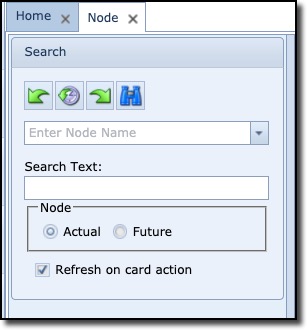
The search (pull-down) field is used to search for nodes matching the entered string in the field
or
when clicking the pull-down icon and using the search fields at the top of each field column to filter your search
The Search Text field is used to search for nodes whose information includes what is contained in the Search Text field, full or partial content of the search text.
The Actual and Future radio buttons, when selected (toggled), will display the currently opened node’s present (i.e., in-service) and future status (i.e., planned new cards)
The Refresh on card action tick box will cause the node window to refresh when there’s a change at card level for that same node.