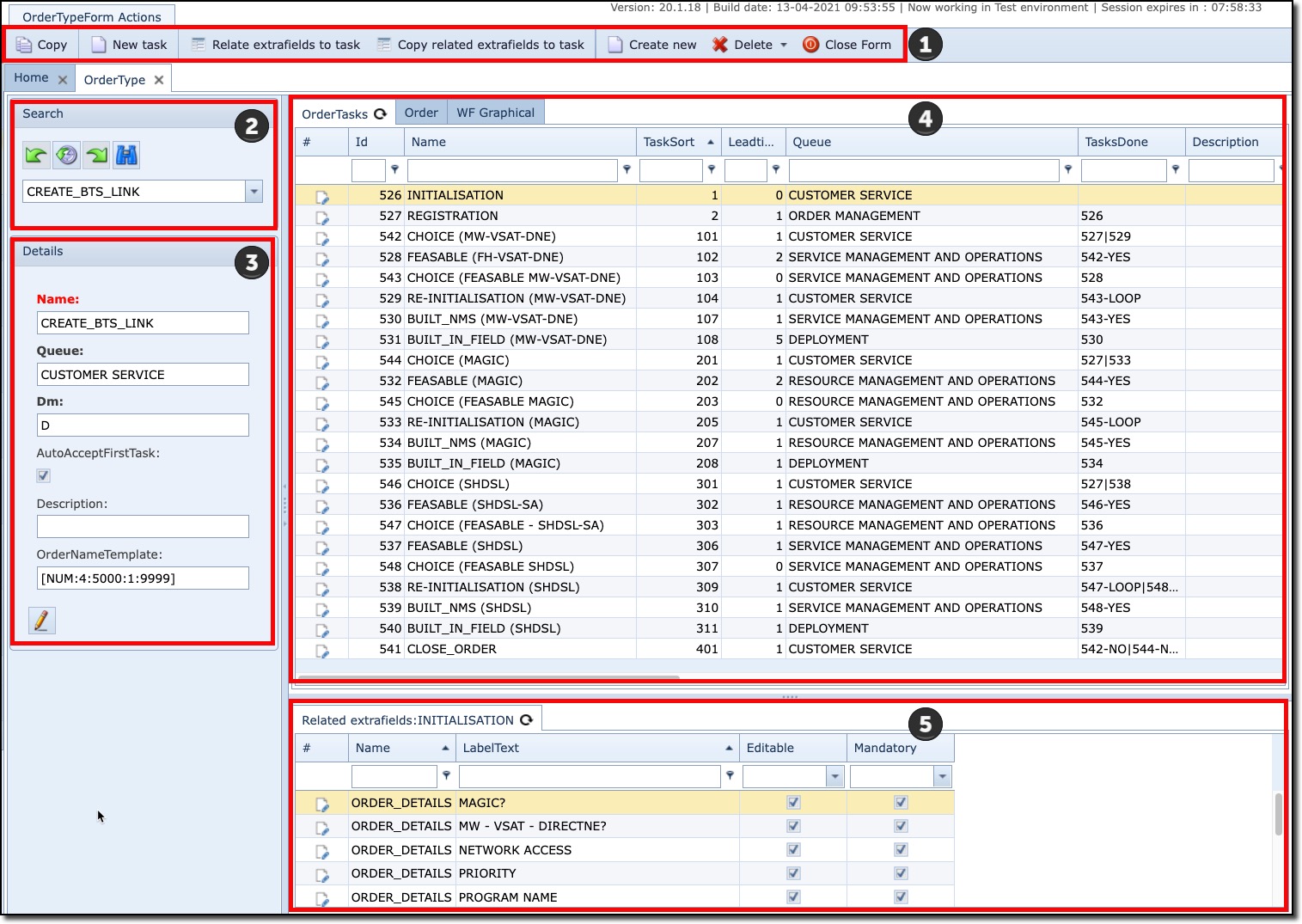
This section describes the various information areas of the Order Type form:
|
Button bar |
Copy |
|
New Task |
Create a new Order Task to be added to this Order Type – popup window form appears |
||
Relate extra fields to task |
Create extra fields for a given Order Task |
||
Copy related extrafields to task |
Copy all extra fields from one task to another |
||
Create new |
Create a completely new Order Type instance |
||
Delete |
Delete the opened Order Type instance |
||
Close Form |
Close the opened Order Type form |
||
|
Search area for locating existing Order Types – Dropdown list or type in the name of the Order Type |
||
|
Summary details area for the opened Order Type including: -the initial queue this Order Type’s first Order Task is assigned to, -whether the lead time is in Days or Minutes, -Tick box for making the first Order Task into Accepted status, -brief description field, -Order NameTemplate field for assigning names automatically based on a given numeric value and/or field/s criteria |
||
|
Display pane containing the following tabs of information: -List of Order Tasks for this Order Type -List of all Orders that are associated with this Order Type -The graphical display of this Order Type’s workflow |
||
|
List of all extrafields relating to particular Order Tasks - optional |
||