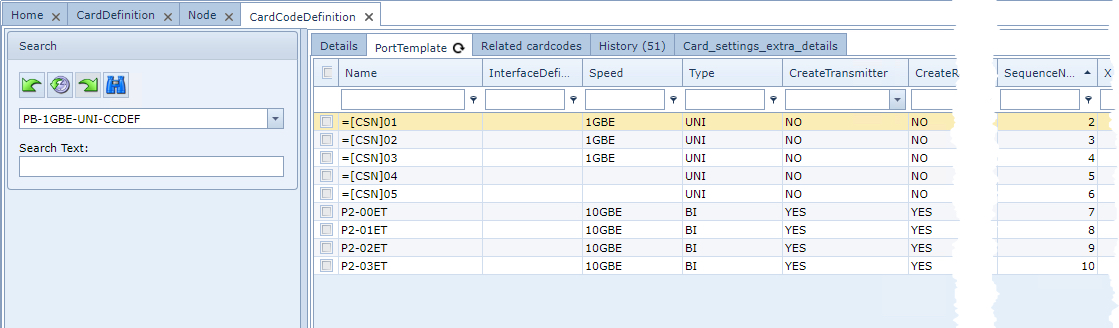
Ports can be created on the main Card Definition or on the Card Code Definition
Note !: It is recommended practice to create ports at the Card Code Definition level

From the CardCodeDefinitionForm Actions button bar:
▪Click on the PortTemplate option followed by the Add port template option
This opens up the Add port template popup window
Fill in the required fields of information, in particular the mandatory ones.
▪Click on the Save icon in the lower left corner of the popup window when finished.

Add Port Template Form Fields
DefinitionName |
Derived from the existing form - auto populated. |
Name |
Name of the port. i.e., P-, P/, GI/ |
Start port |
First port number to create i.e., 01, 1, 003 |
Extra text |
Additional text to be added at the end of the port name - post-fix |
Number of ports |
Number of ports to be created |
InterfaceDefinition |
Interface type selected from the drop down menu i.e., SC/PC, BNC, RJ45 |
Speed |
Port speed - determines the type of connection that can be configured on it. For multiple speeds use the pipe as a separator symbol between speeds i.e., 1GBE|100MB|100MB |
Type |
BIdirectional or UNIdirectional option |
CreateTransmitter |
Option to create a TX port |
CreateReceiver |
Option to create a RX port |
NmsPortName |
Network Management System port name - if available |
Sequence number |
Sequence number of the first port - the default is 1, yet should existing ports already be associated with this Card Code Definition, then a number that represents the next sequence in line after the last existing port should be filled in. In the below screen shots there were already 6 existing ports, so the number 7 is entered. |
Description |
Any additional information related to this port/s |
Example screenshot of adding extra ports to an existing Card Code Definition.
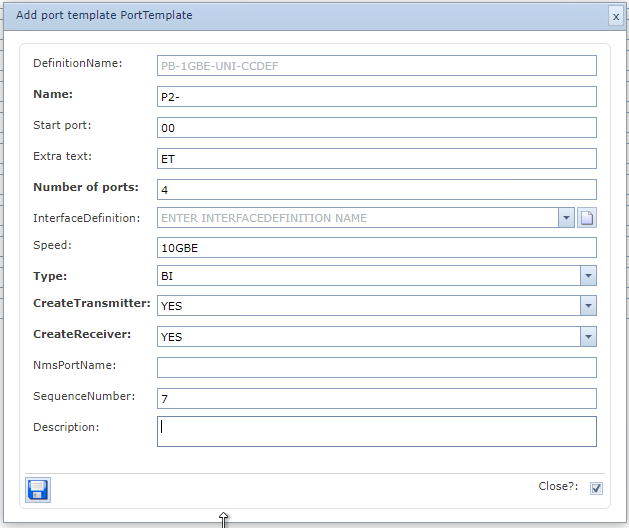
The results of the above form and its field values are reflected in the various columns of information
in the screen shot below.