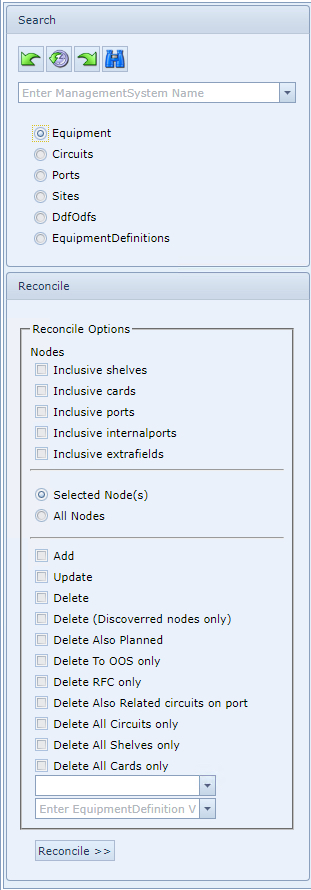
The following is a description of the Reconcile Options available for the Equipment type objects:
|
Reconcile Options – reconcile to the IMS database the following: |
|
|
||
|
Include shelves |
Should the equipment discovered include a shelf or multi-shelf configuration, then all shelves in the Node equipment will be reconciled to IMS - these shelves would be seen in the 'Shelves in IMS not in NMS' tab
|
Include cards |
Reconcile the node including all related cards
|
|
Include Ports |
Reconcile the node including all related ports |
|
Include Internal Ports |
Reconcile the node including all related Internal Ports |
|
Include Extrafields |
Reconcile the node including all related Extrafields |
|
Selected Node(s) |
Reconcile only the ones with their check box ticked and that are not in IMS |
|
All Nodes |
Reconcile all the nodes in the Reconcile tables that are not in IMS |
|
Add |
Add any new equipment discovered that is not yet in IMS |
|
Update |
Update any delta information found in the reconcile tables, to the existing IMS node |
|
Delete |
Delete from IMS, the node/s shown in the IMS reconcile data set, having no match in the NMS [live network]
This delete option on its own, with no other sub options below it, will completely delete the node/s from IMS (including shelves, cards, and ports), provided they are in a status of OOS or PL and have no other related objects associated to it as per the standard IMS rules of object deletion i.e., cables, circuits, IP numbers, that might still be associated to the device. |
|
Delete ( discovered nodes only) |
IMS will Delete Nodes from the IMS database, that are found in the IMS reconcile data set that do not appear in the NMS (live network) |
|
Delete Also Planned |
Delete also any nodes from the IMS database, that are found in the IMS reconcile data set, that have no match in the NMS [live network], that are in a status of PL. (Very Dangerous! Not advised to be used in normal operations, as it is meant as a realignment option and will remove any and all not found in NMS) |
|
Delete To OOS only |
Instead of Deleting node objects from IMS, this action rather sets the selected object to a status of Out Of Service (OOS) instead. Removes nmsid’s and sets to Out Of Service, circuits/equipment that previously existed but are no longer found in the interface. It does not delete them.(Advised option for standard removal as it will keep the reference in IMS for archival purposes with their references to all related history records) |
|
Delete RFC only |
Delete from IMS any node objects with status RFC [Request For Cease] that are no longer in the network |
|
Delete Also Related circuits on port |
This option will delete any related circuits associated with the ports, in IMS - when the Delete incl cards option is used. This will also delete any IP number and Cable objects related to those ports. |
|
Delete All Circuits only |
This option will just delete any related circuits that may be associated with the ports in IMS - it will leave the ports intact and just delete any related circuits |
|
Delete All Shelves only |
This option will just delete any related shelves that may be associated with the nodes in IMS - it will leave the nodes intact and just delete any related shelves |
|
Delete All Cards only |
This option will just delete any related cards that may be associated with the nodes and shelves in IMS - it will leave the nodes and shelves intact and just delete any related cards |
|
Status – dropdown field |
The status selected will be set to the required reconciled nodes. If no status is selected, the default status will be PL (Planned). |
|
Equipment Definition – dropdown field |
This will only reconcile all the nodes that are related to the selected equipment definition |
|



The differences or discrepancies between the NMS and IMS systems will be shown in the IMS Reconcile form.
Some examples can be:
oEquipment type differences
oConnections with a different routing
oConnections on different ports
oCard differences
oCards that are deleted in NMS, but still in service in IMS
|
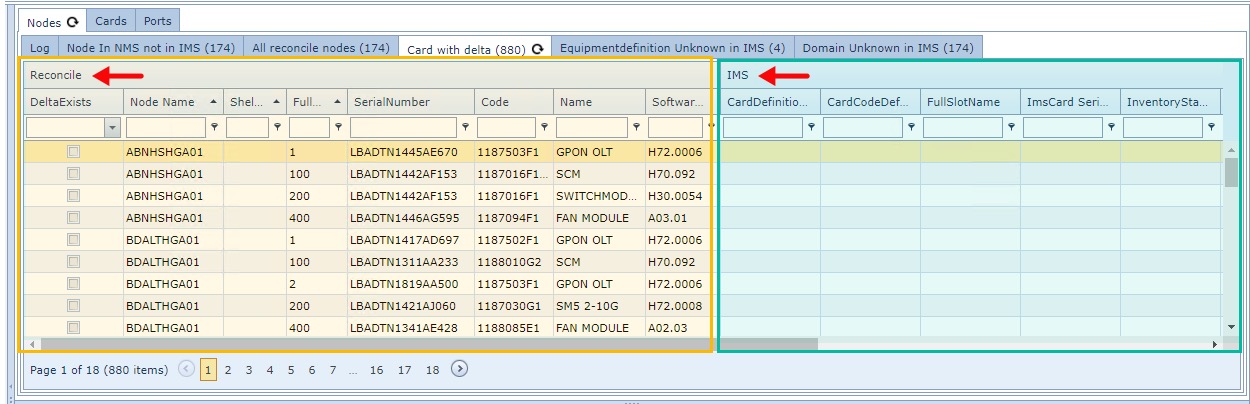
The IMS Reconcile form is logically divided horizontally in two. The leftmost half represents information gathered from the network discovery process and the rightmost half represents the related information gathered from IMS |
|
|
|
In this instance the above screenshot shows that 880 new cards were discovered (left side) whilst the right side representing the IMS data shows no equivalent data. |
Users can correct these kinds of differences using the IMS GUI.