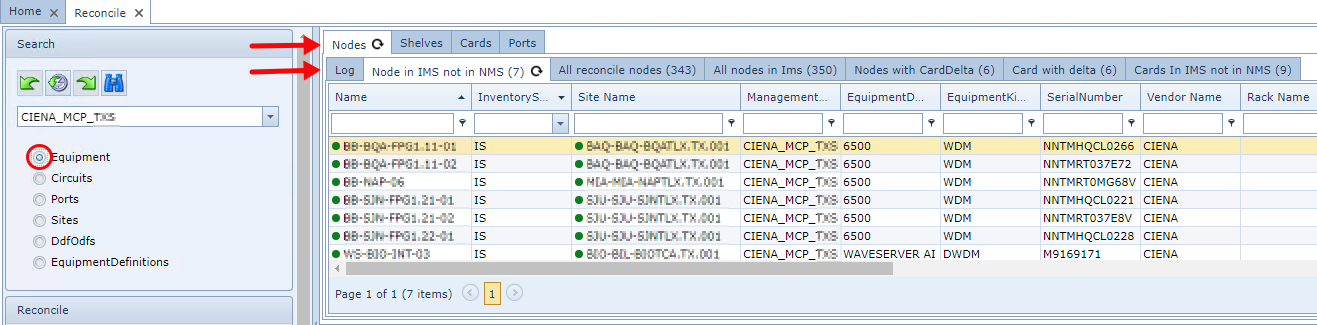
You may have noticed that both horizontal panes of information contain several tabs and these appear depending on the results of a Reconcile run.
These tabs of information contain details regarding network assets found, related IMS network assets, whether data between these groups of assets has changed, and Error messages explaining any differences found.
The following sections will explain the various tabs by IMS object with their labels, including a brief description of the tab, possible causes of differences and errors, and suggest possible solutions.
|
The Upper Tab pages pane will display two rows of tabs for the IMS Node Object, due to its layered modeling: Node, Shelf, Slot, Card, Port, etc. |

The Upper Tab pages pane is divided vertically into three column zones of Reconcile and IMS information. This can be seen in the following screenshot shown by the red, yellow, and blue boxed areas.

Reconcile - Red zone
These are all the records, relating to the network data, from the previous Reconcile routine.
IMS - Yellow zone
These are the records of the IMS objects. If there is a match with the network data, the matching details will shown in the Reconcile columns of information.
Error - Blue zone
When a discrepancy is found or an error occurred during the reconcile process, an error message will be displayed. The Error column zone, will indicate what went wrong during the reconcile process.
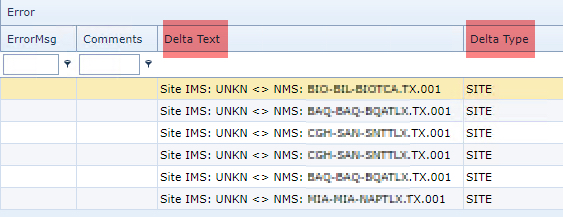
The Delta Text and Delta Type columns are showing information if there are any differences between the Reconcile data - the network - and the IMS object.
For example, a serial number might have been changed in a node in the network. When the Reconcile process is run, the Delta Type content will display SERIALNUMBER, and the Delta Text will contain something similar to Serial number in IMS: ABCD <> NMS: EFGH
In the screenshot below we can observe a similar discrepancy found between the NMS and IMS data regarding the Site object