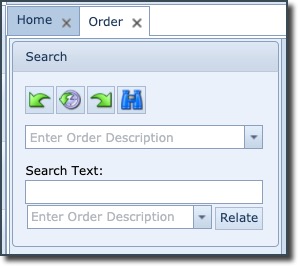
The search (pull-down) field is used to search for orders matching the entered string in the field ... or ...when clicking the pull-down icon and using the search fields at the top of each field column to filter your search
The Search Text field is used to search for orders whose information includes what is contained in the Search Text field i.e. typing in ONE would return records where any field of information contains ONE.
The Relate button is a quick and easy way to relate the two instances in the search fields, simply load both fields with the Order instances to be associated, then click the Relate button. See a fuller description below.