A shapefile is a simple, nontopological format for storing the geometric location and attribute information of geographic features. Geographic features in a shapefile can be represented by points, lines, or polygons (areas) - (ArcGIS)
In order to use the Import Shapefile feature, a User Group's Permission Settings must first be enabled. This is achieved by accessing the UserGroupPermission Tab as follows:
From the IMS Main Menu:
▪Select System | Users | User Groups
This opens up the UserGroup Form
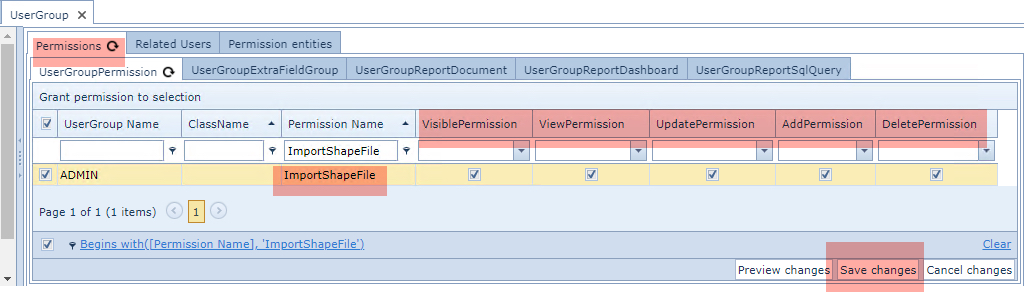
From the Permissions Tab and then in its nested Tab called UserGroupPermission ...
▪Type ImportShapeFile in the Permission Name column filter field and press the Enter/Return key - you should see the Permission Name listed as in the above screen shot
▪Ensure that the various required Permission columns are enabled
▪Click on the Save Changes option button in the lower right corner