In this chapter we make use of The Netherlands' number plan as an example to explain an alternative format to the USA and Canada one.
This example is fairly standard across the world, in as much that Fixed Line telephone numbers contain a prefixed geographical area code to the number, whilst Mobile telephone numbers are prefixed with a fixed number to distinguish it from other types of numbers i.e., fixed line, toll free, mobile pagers, etc.
The Netherlands' geographical numbering plan implements a system of area codes. An area code consists of two or three digits. The larger cities and areas have two digits with a subscriber number of seven digits, permitting more local numbers. Smaller areas use three digits with a six-digit subscriber number.
Fixed line area code examples:
10 Rotterdam
111 Zierikzee
113 Goes
114 Hulst
115 Terneuzen
117 Sluis
118 Middelburg
13 Tilburg
15 Delft
On the other hand, non-geographical number prefixes are ones like:
06 mobile telephone operators,
0800 free service numbers,
084, 085 used for VoIP
087 voicemail and virtual private numbers
Create a new TNR - Standard
|
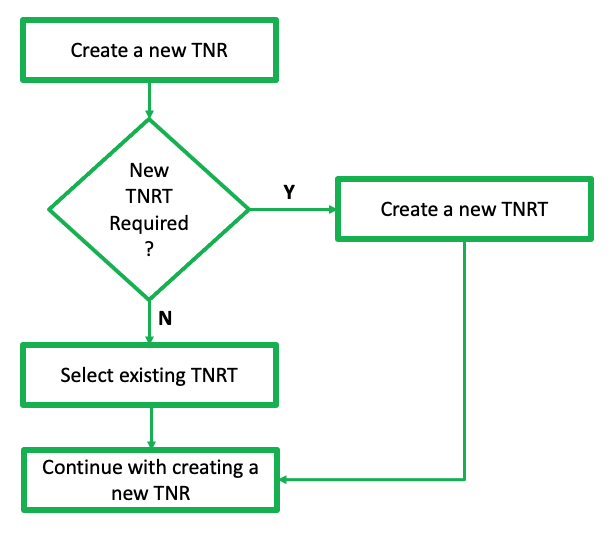
This section can take two possible routes, depending on the option chosen at the TelephoneNumberRangeType (TNRT) field. If a new TNRT is required, then there is a separate chapter for this process, after which you will return to complete this TNR section. |

From either of the TelephoneNumberRangeForm Actions tab:
▪Select the Create New icon - which will open up the Create new TelephoneNumberRange popup window
Un-opened form

Current opened form
▪Click on the Create New option which then opens the Create new TelephoneNumberRange popup window
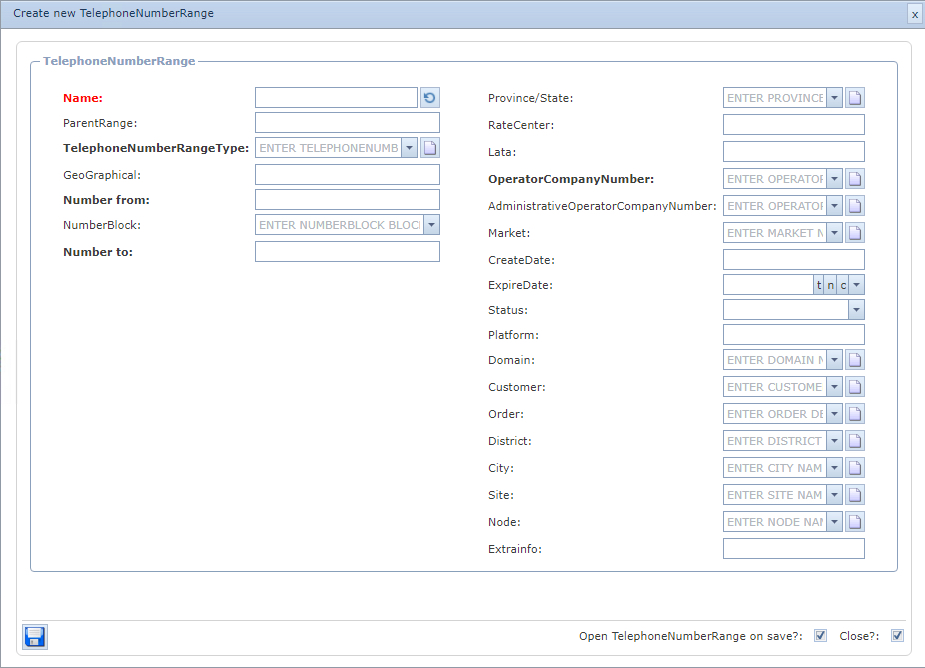
▪Click on the Create New icon - which will open up the Create new TelephoneNumberRange popup window
▪Fill in the required fields of information, in particular any mandatory ones:
Name |
Option to auto generated from the Name Template field under the Telephone Number Range Type - (leave this until the number range has been selected, and it will be auto completed according to the Name Template established during the TNRT setup process) or manually typed in according to your standard naming convention |
||
Parent Range |
This will be auto-completed if this range is a sub-range |
||
TelephoneNumberRange Type |
Search and select from the existing list, or Create a new instance by clicking on the new icon
|
||
Country Code |
Auto derived from the TNRT selection |
||
GeoGraphical |
Auto derived from the TNRT selection |
||
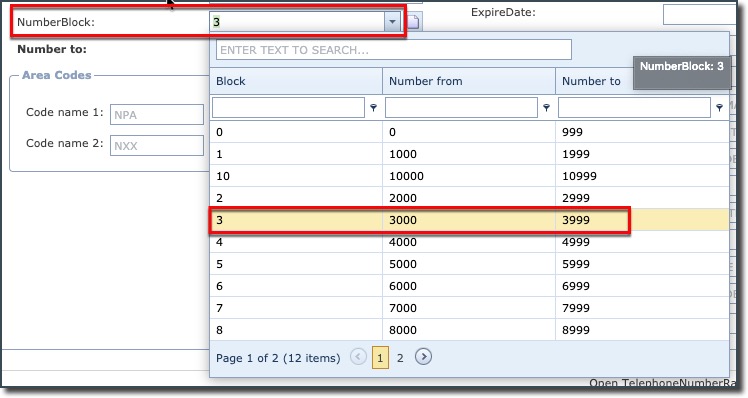
The following 4 fields are related to the number blocks required, and although the Number from and Number to fields can be manually set, it is common practice to select a range from the NumberBlock field's drop down list: oK block (K = 1000 numbers) oA block (A = 10,000) - located at the end of the Number Block drop down list
|
|||
NumberBlock |
select a K or A block as required |
||
Number from |
auto populated from NumberBlock selection |
||
Number to |
auto populated from NumberBlock selection |
||
In this screen shot, a K block has been selected. Further on in this document there is a section on using an A block of numbers.
|
|||
Code name 1 |
In this example ... AREACODE - derived from the associated TNRT |
||
Code 1 |
Fill in the required area code i.e., 10 for Rotterdam |
||
|
|||
Province / State |
Regional areas within countries |
||
LATA |
Local Access and Transport Area. Geographical areas that usually, not exclusively, relate to Market Areas and some cross state boundaries. Rule: a LATA must be linked to a Rate Center for the LATA field to display valid instances in its dropdown for subsequent selection. If a LATA is not available in the dropdown field for selection, then one must be created - refer to the section called LATA or Rate Center on how to relate these objects. |
||
Rate Center |
Rate Centers are used within the assignment, routing, and rating/billing databases in the telephony industry. Rule: a Rate Center must be linked to a Province/State for the RateCenter field to display valid instances in its dropdown list for subsequent selection. If a Rate Center is not available in the dropdown field for selection, then one must be created - refer to the section called LATA or Rate Center on how to relate these objects. |
||
Operator Company Number (OCN) |
Operating Company Number - A four-character code assigned by the National Exchange Carrier Association (NECA) to any telecommunications provider. Specifically used to identify CLEC and Reseller usage data. Also known as Company Code. Rule: an OCN must be linked to a Vendor for the OCN field to display valid instances in its dropdown for subsequent selection. If an OCN is not available in the dropdown field for selection, then one must be created by clicking on the New icon at the end of the OCN field … this will open up the Create new OCN popup window. |
||
OCN Vendor |
OCN name |
||
Administrative Operator Company Number |
Administrative OCN |
||
Market |
This is a user defined field that further categorizes a range of numbers according to a company’s business case i.e., by region like South East or in accordance with the company's business case |
||
Create Date |
Optional - System date and time stamp is the default |
||
Expire Date |
Optional - user defined expiry date |
||
Status |
Optional - drop down list provided - used for TNM Ranges and Telephone Numbers. New statuses can be created on the fly from this field when first creating a new TNR. |
||
Platform |
Optional - user defined field |
||
Domain |
Optional - drop down list provided - Domain is accessed from the IP module and can be modified and added to. Domain is related to other IMS objects, other than IP. |
||
Customer |
Optional - drop down list provided |
||
District |
Optional - drop down list provided - District is accessed from the City feature under the Site module and can be modified and added to. |
||
City |
Optional - drop down list provided |
||
Node |
optional - drop down list provided |
||
Extra Info |
Optional - user defined field |
||
▪Click on the Save icon in the lower left of the window
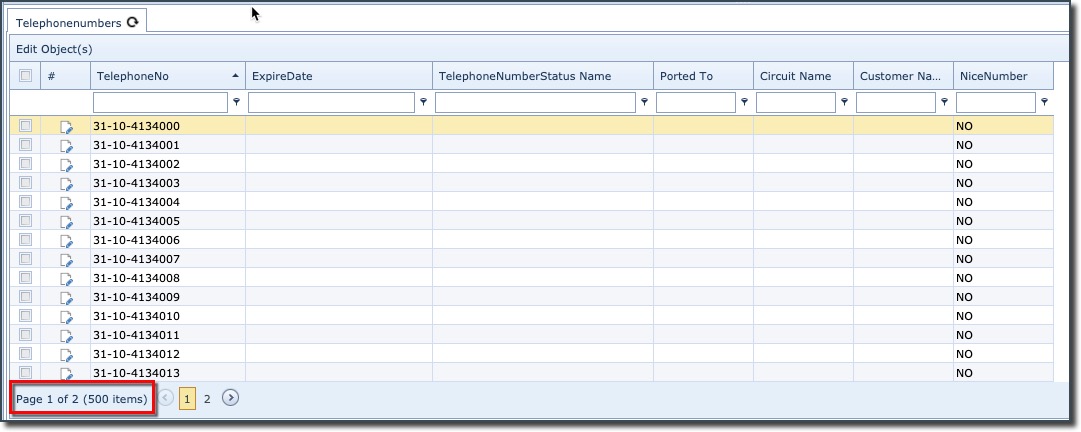
This will generate 1000 telephone numbers as shown in the following example screen shot.