Introduction
User Data Model
The following is an introduction to the user access and data model in VC4’s IMS
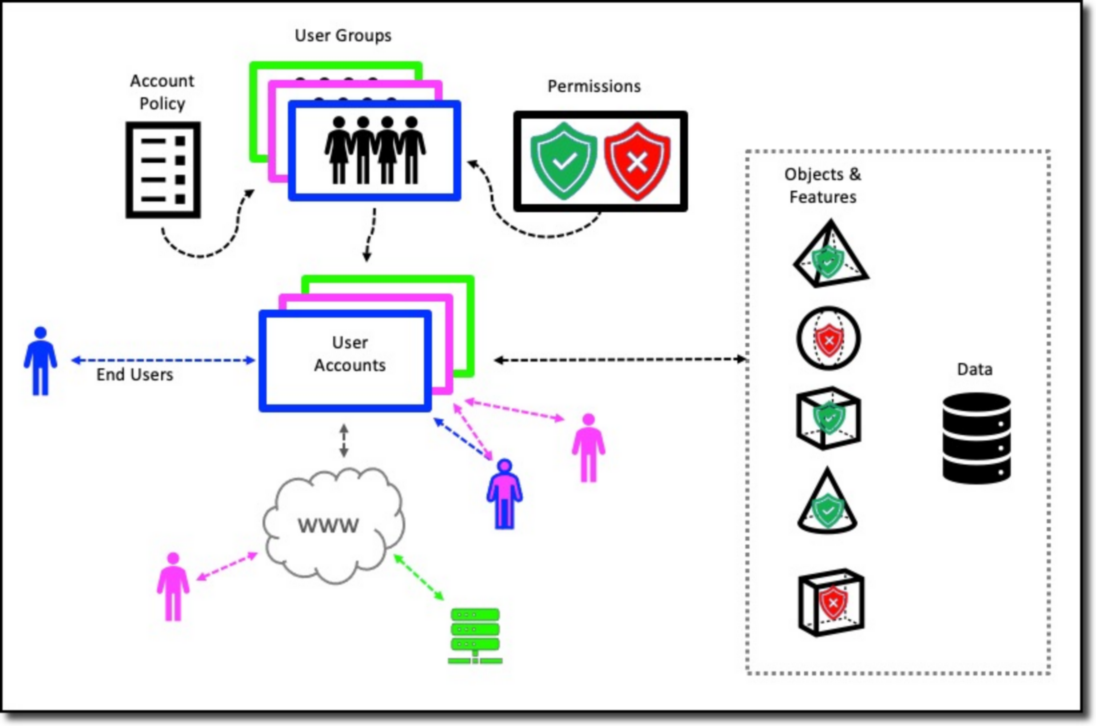
The IMS application is a user-based system. All persons and systems require a user account to be able to use the IMS functions and data.
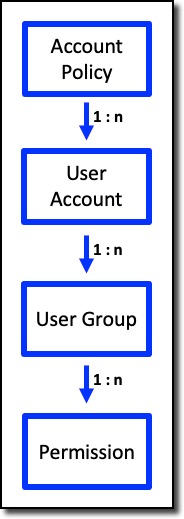
One account policy with settings, is common across all user accounts in a single IMS environment
An IMS environment may consist of multiple IMS applications (websites, webservices) accessing one database where the database may contain multiple IMS schemas. The account policy is an IMS global configuration.
One or more user accounts exist within an IMS environment. Each user account has a password based on the account policy settings. A user account belongs to more than one user group.
One or more user groups can exist within an IMS environment to which certain permissions are configured that range from being able to open IMS, accessing certain forms with read only or write access, etc.
More details about User Access and Control is described further on in this document.
IMS Access and Control Functionality
When considering allowing a user or third party system to access the IMS system, one should consider various aspects about their use of the system, this will help determine how to set up an account and what they should and should not have access to.
Role withing the organisation |
Are they provisioning services, building network components, detecting faults, selling services, remodelling and designing the network; physical or logical, etc. |
Responsibility |
Are they creating new or deleting existing network components and services, just seeking information to perform their tasks, in charge of a department like network build, etc. |
Network area |
Do they need access to all sectors of the network or IMS features like Bulk loading or Reports, or just certain areas like Core connectivity (WDM, Fibre), or maybe just the Sites and Equipment. |
Tasks they carry out
|
What tasks a user carries out is a great way to help determine what they need to access, as well as what level of modification to the network they should be allowed to do, i.e., add, delete, or edit. |
The following sections will explain in more detail the usability aspect of User Access and Permission features, namely the User Account, Group, and Policy.