Once an impact assessment has been carried out, the next step is to inform any related customers. This is achieved by sending emails out with the relevant work information that will be carried out.
|
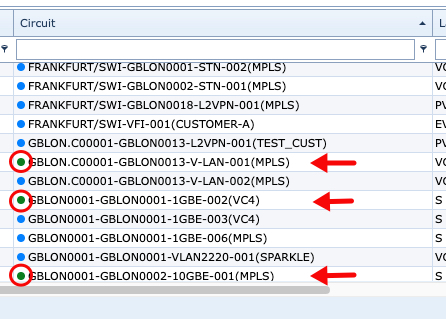
Although the Impact Assessment routine will disclose a list of all Circuits in IMS that will be affected by a Planned Work instance, only those that show up as In Service status will be considered when Informing Customers - consider the following screenshot where only 3 Circuits are in a status of In Service.
|

Different user groups or departments can set up predefined email templates in advance for different types of planned work. The IMS communication module can handle various languages when it comes to email setup.
|
In order to inform customers, it is necessary to associate two IMS elements beforehand: |
|
➢Select the required Planned Work instance and |
|
➢Select the relevant email template to use |
Open Inform Customers
From the IMS Main Menu:
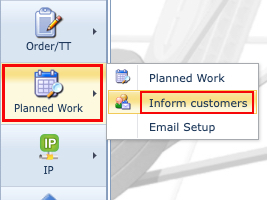
▪Click on the Planned Work option, this opens a dropdown list of further options
▪Click on the Inform customers option
This opens up a blank Inform Customers form.
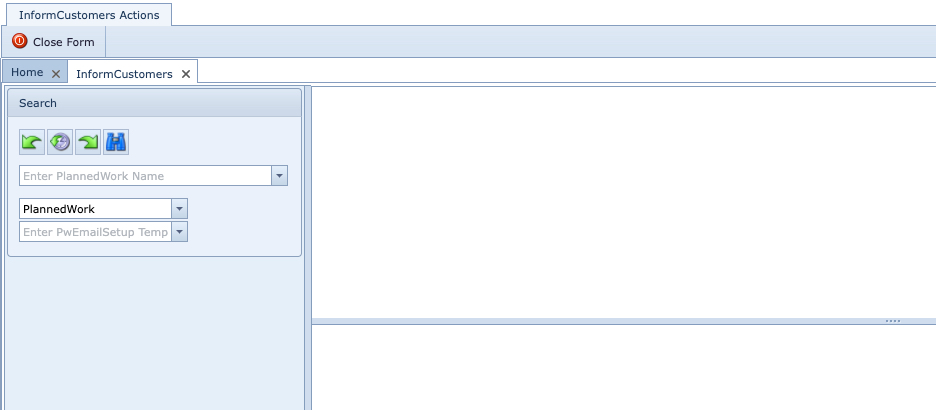
Search Inform Customers
Searching for existing Inform Customers instances can be through the dropdown menu list in the Search area of the Inform Customers form.
