The Lower Tab pages pane will display the particular details of any selected row or record from the Upper Tab pages pane.
|
Much like the Upper Tab pages Grid Columns, the Lower Tab pages Grid Columns also display Reconcile, IMS, and Error information - yet for a single IMS object instance. |

If no details appear automatically, click on the button Show details of selected record in the button bar.
Note: the Single Item tab pages will only appear if the related information has been found in the database.
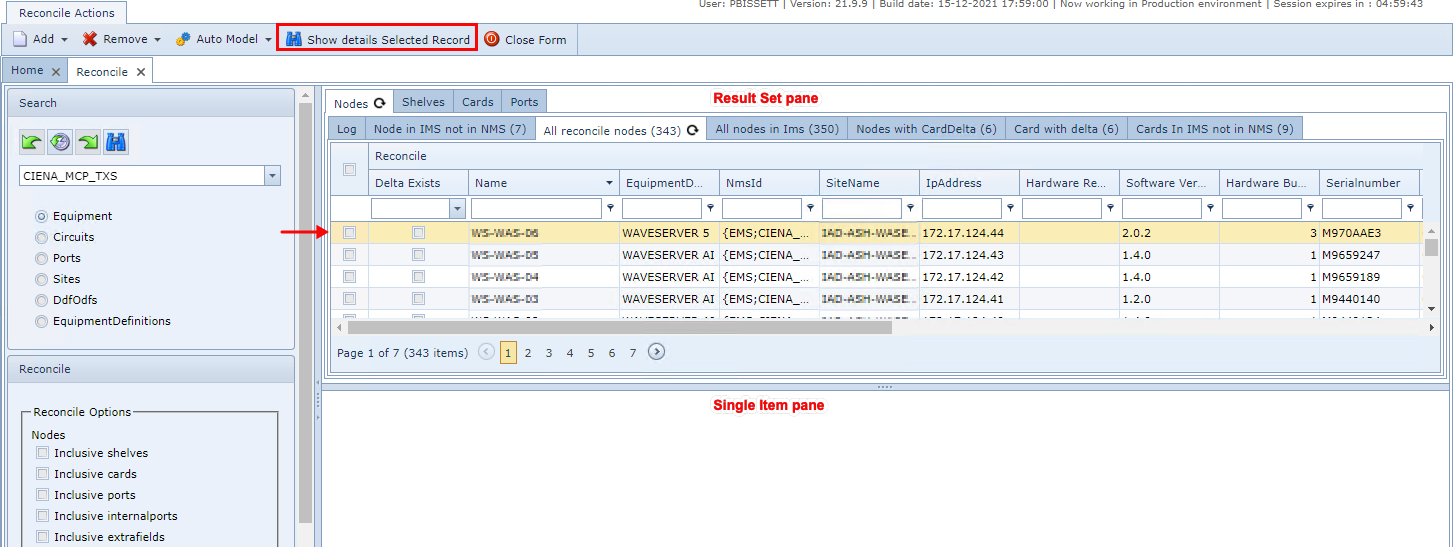
These are the possible tab pages:
Ports
This lists all the reconcile ports that are related to the selected reconcile circuit. From here the following can be checked:
oIf there are ports related to any IMS port.
oWhich port may have discrepancies with IMS, could not be created or updated for some kind of reason. Check the error message column
oWhich extra fields did not have any problem during the reconciliation.
Internal ports
This lists all the reconcile internal ports that are related to the selected reconcile circuit. From here the following can be checked:
oIf there are reconcile internal ports related to any IMS internal port.
oWhich reconcile internal ports maybe have discrepancies with IMS, could not be created or updated for some reason. Check the error message column
oWhich internal ports did not have any problem during the reconciliation.
Ddf/Odf patch point
This lists all the reconcile ddf/odf patch points that are related to the selected reconcile circuit. From here the following can be checked:
oIf there are reconcile ddf/odf patch points related to any IMS ddf/odf patch point.
oWhich reconcile ddf/odf patch point may have discrepancies with IMS, could not be created or updated for some reason. Check the error message column.
oWhich reconcile ddf/odf patch points did not have any problem during the reconciliation.
Sub-circuits
This lists all the reconcile sub circuits that are related to the selected reconcile circuit that will be the carrier.
From here the following can be checked:
oIf there are reconcile sub circuits related to any IMS circuit.
oWhich reconcile sub circuit may have discrepancies with IMS, could not be created or updated for some kind of reason. Check the error message column.
oWhich reconcile sub circuits did not have any problem during the reconciliation.
Extra fields
This lists all the reconcile extra fields that are related to the selected reconcile circuit. From here the following
can be checked:
oIf there are reconcile extra fields related to any IMS extra field for the circuits.
oWhich reconcile extra field may have discrepancies with IMS, could not be created or updated for some kind of reason. Check the error message column.
oWhich reconcile extra fields did not have any problem during the reconciliation.