The Planned Work form contains 4 panes of information as described below.

Summary Description
|
Search pane: search for existing Planned Work instances, either with the Dropdown field or type in the Search Text field |
|
The Details pane contains the time aspect information at a glance. |
|
The Planned Work information pane contains a further 4 tabs of information: •Details - containing a further 2 tabs: Details and Date related information •Logging - a grid containing user defined text description - separate from the system logging which can be found in the History tab mentioned below •Involved Objects - a grid listing the IMS objects involved in the Planned Work •History - a grid containing system produced logs based on user activity on the Planned Work |
|
Impacted circuits and services pane containing 2 tabs: •Main Circuits: a grid containing a list of the main carrier circuits involved •Impact Per Group: a grid containing a list of all sub circuits related to carrier circuits listed in the Main Circuits tab |


Detailed Description
3. Planned Work information pane:
Details Tab
Name |
The name of this new Planned Work instance |
PwEngineer |
The name of the person logged into IMS running this Planned Work instance |
PwCategory |
A customer service impact severity level measure - defaults are CAT-1 to CAT-4. These categories are configurable with the assistance of VC4 engineers to capture rules for, say, no concurrent Planned Work CAT-1 instances can be run at the same site for fear of disrupting backup routes for affected services. For further information on categories please contact VC4. |
Status |
Three options available to describe the current state of a Planned Work instance. Options are: Active, Canceled, and Closed. These status indicators are for descriptive purposes only. |
Description |
A free form text field of information to best describe the overall function of a Planned Work instance i.e., Fibre upgrade to access site. |
Visible in inform customers form |
Option for this Planned Work instance to be available for selection from the Inform Customers form. Options: Yes, No. |
CustomersInformed |
When a Planned Work instance has been carried out and customers have been notified, then this field is auto-populated with Yes. |
RequestedBy |
Free form text field to describe person, group, or third party system that initiated this Planned Work. |
EmailSetup |
Select from a drop down list any available Email Setup instance to be incorporated into this particular Planned Work. |
InformalSql |
SQL script to search for specific Contacts for the Planned Work to send emails to |
Ttbt |
Other system's Trouble Ticket name |
CscStory |
Other system's Customer Service Centre Story (details) |
Ttext |
Other system's Trouble Ticket text field |
DescriptionToCsc |
Other system's Customer Service Centre comment |
Plannedwork externalId |
Other system's Planned Work ID |
External Organisation |
Other system's Organisation name |
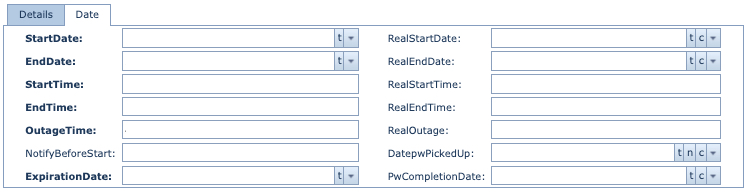
Date sub tab |
||
|
||
StartDate |
Projected start date |
|
EndDate |
Projected end date |
|
StartTime |
Projected start time |
|
EndTime |
Projected end time |
|
OutageTime |
Projected outage time - free alphanumeric field describing the duration the network object will be acted on causing the outage - i.e., "1 HOUR", "30 MINS" |
|
NotifyBeforeStart |
Optional administrative type field for additional information |
|
ExpirationDate |
Optional administrative type field for additional information |
|
RealStartDate |
Actual date the Planned Work commenced |
|
RealEndDate |
Actual end date the Planned Work finished |
|
RealStartTime |
Actual start time the Planned Work commenced |
|
RealEndTime |
Actual end time the Planned Work finished |
|
RealOutage |
Actual outage time the Planned Work commenced - free alphanumeric field describing the duration the network object was acted on causing the outage - i.e., "4 HOURS", "1 DAY" |
|
DatepwPickedUp |
Optional administrative type field for additional information |
|
PwCompletionDate |
Optional administrative type field for additional information |
|