In this section we show how to create an association between the Sub Node Equipment Definitions and the parent node Equipment Definition
1 |
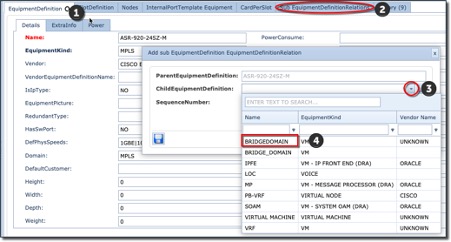
Go to the tab containing the parent Equipment Definition (ASR-920) |
2 |
Then click on the Add sub EquipmentDefinition option in the EquipmentDefinitions Action tab |

The Add sub EquipmentDefinition EquipmentDefinitionRelation popup window will appear
3 |
Click on the ChildEquipmentDefinition drop down field |
4 |
Search and select the first of the two Sub Node EquipmentDefinitions i.e., BRIDGEDOMAIN, then a sequence number should you wish it to appear in any particular order, when the end user operates this feature |
5 |
Finally click on the save icon button at the bottom left corner |
6 |
Repeat steps 3 through 5 to relate the VRF Sub Node Equipment Definition |
This now sets up the way IMS will handle a given parent node with its pre-associated Sub Nodes.