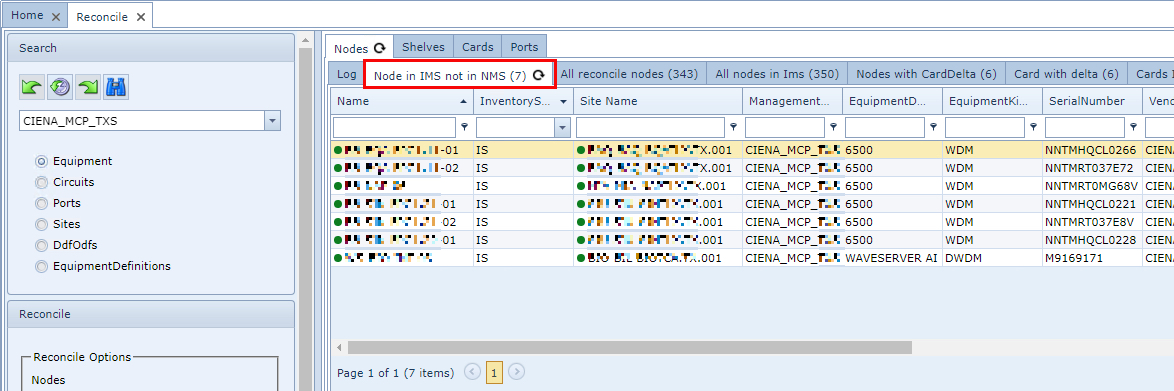
Node in IMS not in NMS
The Node tab shows that there are nodes in IMS, in the above example belonging to the Ciena network, yet these nodes are not found in the reconcile node table.
Possible causes
oIMS nodes are created manually in IMS, but not yet in the actual network
oThe node has been deleted from the network
Possible solutions
oCheck who has created the node in IMS and ask the person why they have created it and why the equipment is in service in IMS while not in the network
oIf the equipment has been created via reconciliation, check in the network if the node still exists. If the node still exists, but is not available in the reconcile form, VC4 helpdesk should be informed
Node in NMS not in IMS
This means that the nodes have been found in the network but are not present in IMS.
Possible causes
oOne of the related objects does not exist in IMS like Site, Domain, IP-address, Node type
Solution: Create the missing objects in IMS
oThe node already exists in IMS but has a different Network ID
Solution: Delete the old Network ID and relate the reconcile node to the IMS node.
oReconciliation process did not run yet
S Solution: Reconcile the nodes
All reconcile nodes
This tab page lists all the nodes that exist in the reconcile table related to the selected network platform
All nodes in IMS
These are all the nodes in IMS related to the selected network platform
Card with delta
This tab page lists all the nodes that exist in IMS and has related reconcile cards. One or more of these reconciled cards show discrepancies
Possible cause
oAny property on the reconcile card object could be different from the related card in IMS, these differences are described in the Delta text column
Possible solution
oCheck the card in the node in IMS, check with persons responsible for the NMS to see if the information is correct.
➢If this is correct, the card can be reconciled
➢If the information is not correct, VC4 helpdesk should be informed
Node on Site Unknown or Unkn
This tab page lists the nodes that are set to location UNKNOWN or UNKN.
If the reconcile process fails to extract the location information from the network data or a suitable naming convention, then it will set these nodes to the unknown location.
Possible Solutions
oCheck with the network team why the location cannot be discovered
➢Location name could be set incorrectly in the network
➢Location name does not exist in IMS therefore create this location
oIf the location or site is not in the network data or in the node name, set the location manually in the node form - on a per node basis
Equipment definition unknown in IMS
The nodes listed have a node type that do not exist in IMS.
Solution: Create the new node type in IMS and reconcile the related node again