User Personal Details
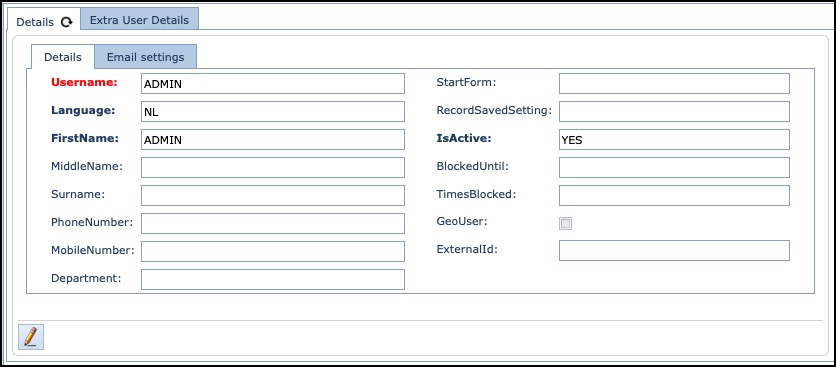
The Details tab contains the following fields:
Username |
This user account’s Username. Can be an individual, group, or department |
Language |
Choice of 4: English, French, German, Netherlands. The email template for the Planned Work notifications can be defined with different languages. You will also see the language setting on the Contacts form (object) – this also refers to this email template feature. |
FirstName |
User’s first name |
MiddleName |
User’s middle name |
Surname |
User’s Surname |
PhoneNumber |
Contact number |
MobileNumber |
Contact number |
Department |
Department name |
StartForm |
Set this User’s starting object form once they successfully log in, i.e., display the Site form as soon as they log in. |
RecordSavedSetting |
Enable logging of this User’s Saved activities on IMS objects |
IsActive |
Determines if this User can operate IMS. Particularly useful if User accounts need suspending. Option is Yes or No. |
BlockedUntil |
Period in minutes a User should be blocked for. |
TimesBlocked |
Based on number of times Account Lockout Threshold has been triggered – see Accounts Policy feature. |
GeoUser |
Determines whether this User has access to the Geo Mapping feature |
ExternalId |
For customer that have an external user authentication system, when selected, IMS checks the authentication in that other system. |
Extra User Personal Details

This tab contains two fields of information - Company and Position related to this User
User System Details
This section describes the User’s details regarding IMS system access, permissions, and activity aspects.

The number of tabs displayed varies from User to User account and is determined by their level of activity in IMS.
UserRights |
List of all Work Queues this User belongs to |
SystemAccount |
List of third party system accounts associated with this User |
QueueMamber |
List of Work Order Queues this user belongs to i.e., provisioning, Network Build, Accounts, etc. |
Working hours |
A calendar display for this User in several formats i.e., Day, Week, Timeline |
User searches |
Displays the User's total number of search activities in IMS including the date and time, IMS object and variables, etc. |
LoginOut |
Displays the total number of times this User has Logged in and out from IMS, including the date and time and operating system used. |
History |
In-depth detailed User activity in IMS including Date and Time, IMS Entity, activity description, field and variable data changes made. |
All Users |
List of all IMS User names and group membership details. |