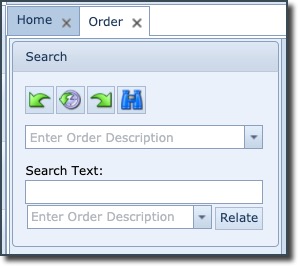
An existing order can be searched for by:
oTyping in the Order's name, or part of the name, in the first search field. Alternatively by clicking on the pull down arrow to reveal a full list of all Orders.
oTyping in the Order's name, or part of the name, in the second field followed by pressing the Enter key. This will provide a Search tab in the Order/TT and Tasks details area with all IMS objects (not just Orders) relating to the search field.
oThis third search field is designed to locate other Orders that are to be related to the current open Order. Once located the Relate button is selected to that creates an association between the two Orders.
For more information on the Relate button and its functionality please refer to the topic called Relate Order to other Orders further on in this Order/TT section. |