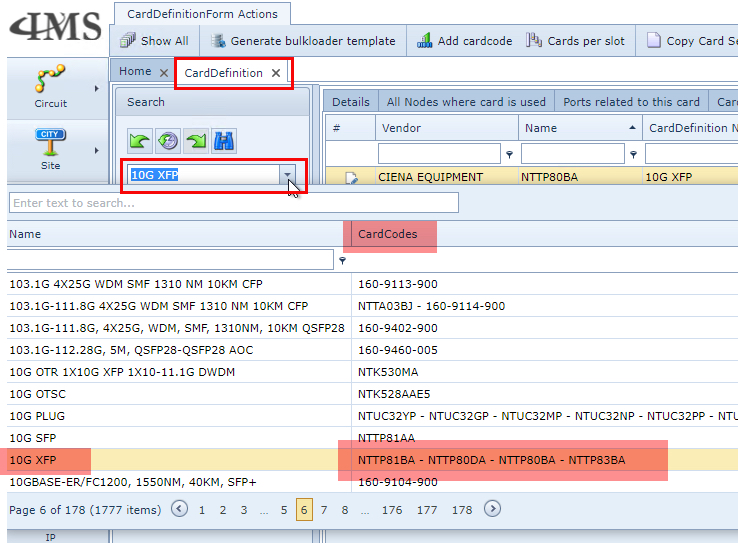
In order to view Card Code Definitions belonging to a Card Definition, there are two methods in doing so:
Method 1:
From the Card Definition form:
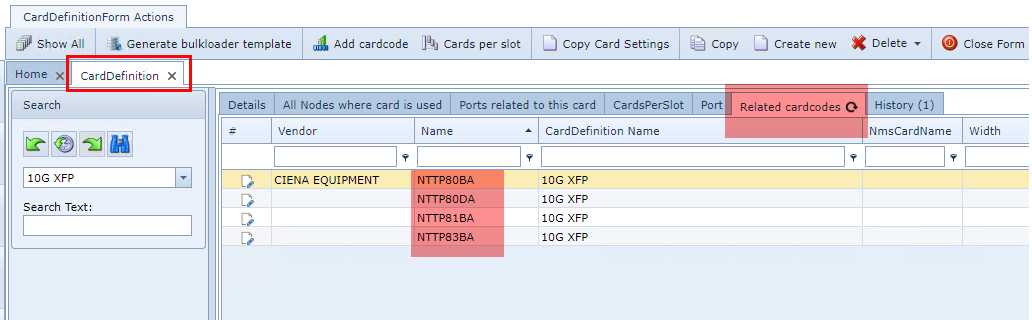
▪Select the Related cardcodes tab
▪Type in the name of the Card Definition in the Search field or select it from the dropdown list
This will open up the Card Definition's form.
In the Name column is where any related Card Code Definitions are displayed
These can be individually clicked on which opens up their CardCodeDefinition form, revealing further
definition details
Method 2
This method provides a quick glance prior to clicking on the name of the Card Definition
From the Card Definition form:
▪Look for the required Card definition from the Search area drop down list - don't click it.
In the CardCodes column is where any related Card Code Definitions are displayed.
Unlike Method 1, these individual Card Code Definitions cannot be individually clicked on, to open up their
CardCodeDefinition forms